Chart Practice Walkthrough
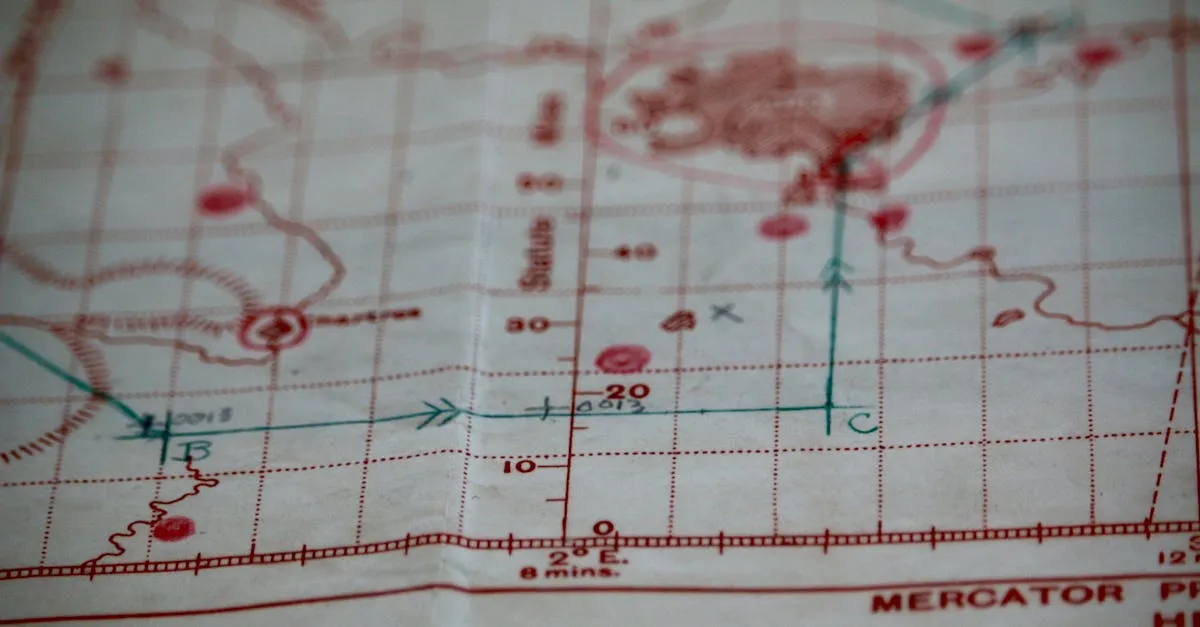
Every chart question on the Part 107 exam is the same machine wearing different clothes: locate a point, read the symbols at that point, apply one rule. This lesson runs the full loop — the airspace decision tree, obstacle arithmetic, airport data blocks, and the TFR trap — in the format you’ll actually meet at the test center: a numbered figure, a numbered area, a question.
How the Exam Shows You a Chart
You won’t receive a sectional. You’ll get the FAA Testing Supplement (CT-8080-2H) — a bound book of figures identical for every test-taker. Questions read like:
Refer to Figure 21. Determine the airspace class at Point A in Area 3.
The rhythm that works: find the figure, find the numbered area, put your finger on the point, then run the decision tree below. Every chart question rewards system over speed — and they’re worth the same one point as the trivia.
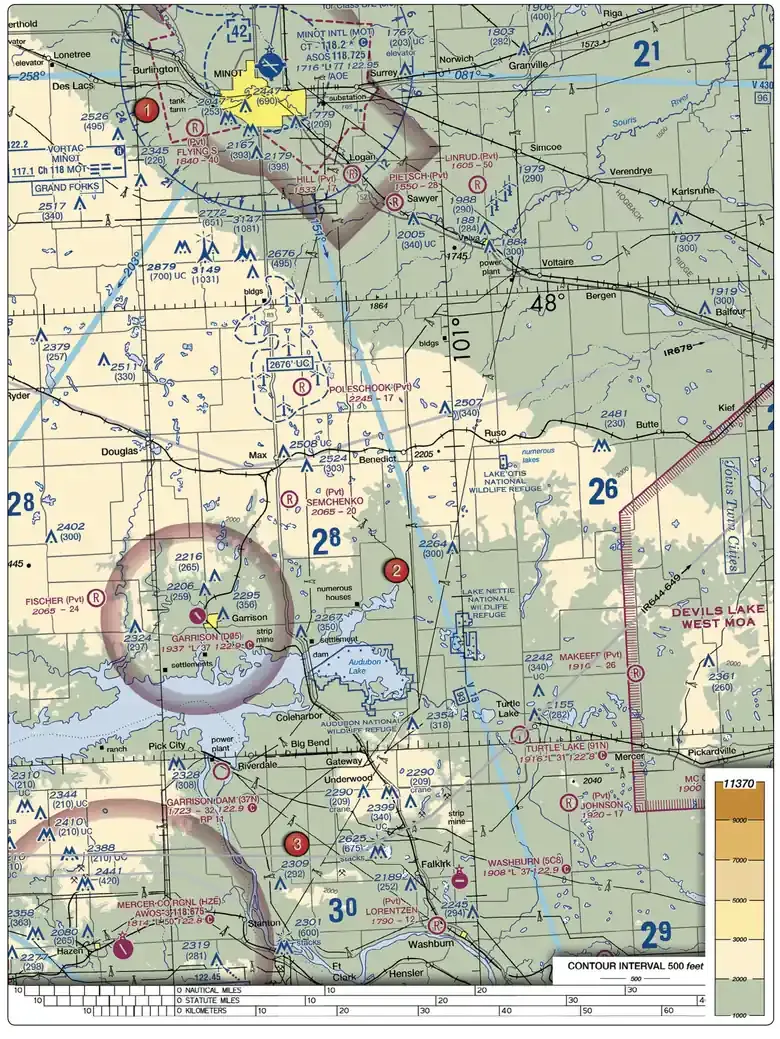 Figure 21 itself — the plate behind a whole family of exam questions. Practice pointing to an area number and naming its airspace cold.
The Airspace Decision Tree (Memorize This Order)
Run top to bottom at your point. First match wins:
- Inside solid blue concentric circles? → Class B (authorization required)
- Inside solid magenta circles? → Class C (authorization required)
- Inside a dashed blue circle? → Class D (authorization required)
- Inside a dashed magenta line? → Class E surface area (authorization required)
- Soft magenta shading? → Class E begins at 700 ft AGL; your 400-ft flight is in Class G below it
- Soft blue shading? → Class E begins at 1,200 ft AGL; below is Class G
- Nothing charted? → Class G by default (1,200-ft floor above you in most of the country)
Two traps live inside this tree. First, the extension: dashed magenta lines that reach out from a Class B/C/D core along an approach corridor are Class E-to-the-surface — authorization required, even miles from the airport. Second, the boundary question: if the point sits near a boundary line, read the offset top/bottom numbers and the leader lines before deciding which side you’re on.
Scenario 1: “Can I Fly Here?”
Setup: You’ve been hired to inspect a tower under construction at coordinates N 46°54’, W 96°48’ near an airport.
Step 1: Find the coordinates. Latitude band first (46°54’ — convert from 46.9° by multiplying 0.9 × 60), then the longitude band (96°48’ from 96.8°W). Tick marks walk you to the intersection.
Step 2: Identify the airspace with the decision tree. Look for the airport symbol’s color, circles, gradients.
Step 3: Check altitude markers. If a boundary is near, read the top/bottom numbers. A point under a shelf marked 100/40 is in Class G below 4,000 ft MSL.
Step 4: Check for special areas and obstacles. Restricted areas, MOAs, MTRs, obstacle clusters, and the tower you’re there to inspect.
Step 5: Answer with the rule. Class G → no authorization. Class B/C/D/E-surface → §107.41 authorization first. Below an E floor → Class G, no authorization.
Scenario 2: “What’s the Obstacle Height?”
Setup: The chart shows an obstacle symbol near your operating area.
Read the symbol:
- Top number (bold) = MSL elevation of the obstacle top
- Bottom number (parentheses) = AGL height of the structure
- Lightning bolt = lighted at night
Worked example: an obstacle shows 1562 (311).
- Top of the obstacle: 1,562 ft MSL
- Structure height: 311 ft AGL
- Implied ground elevation: 1,562 − 311 ≈ 1,251 ft MSL — two numbers always yield the third
The FAA might ask:
- “Height AGL?” → 311 ft
- “Height MSL?” → 1,562 ft
- “How high may you fly while inspecting this tower?” → up to 711 ft AGL: within 400 ft laterally, §107.51(b) allows 400 ft above the structure’s top (311 + 400)
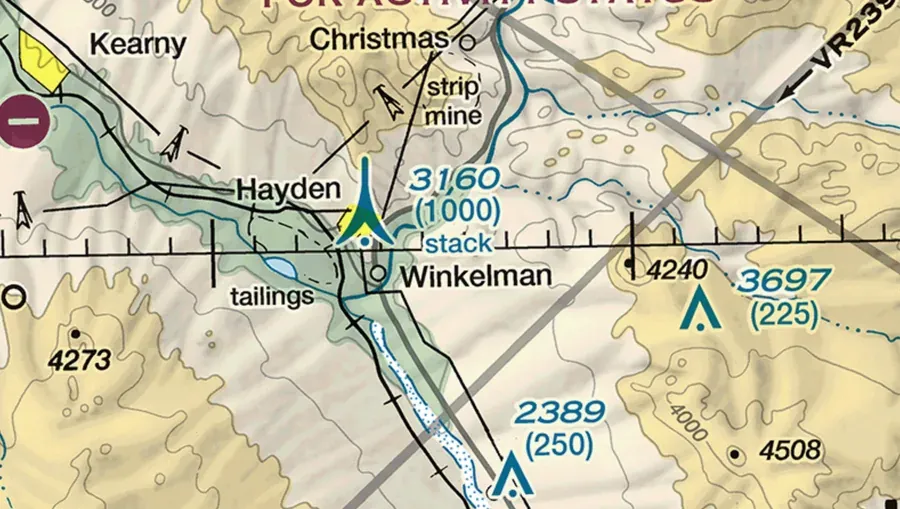 The obstacle read in context: the cluster marks a group (tallest shown), the lone triangle with a bolt is your inspection target.
Scenario 3: “Decode This Airport”
Setup: The figure shows an airport with its full data block. Read it in order:
- Symbol color — blue = towered (ATC), magenta = non-towered (self-announce on CTAF)
- Runway shape — filled = paved, open = turf/gravel
- Frequencies —
CT 125.3is a tower;CTAF 122.8marks a non-towered field - Field elevation in feet MSL — subtract from the Class D bracket
[28]to get the airspace depth above the airport - Runway length in hundreds of feet, and
Lfor lighted - Runway numbers — magnetic azimuth ÷ 10 (runway 27 ≈ 270° magnetic), so the number itself tells you the runway’s alignment
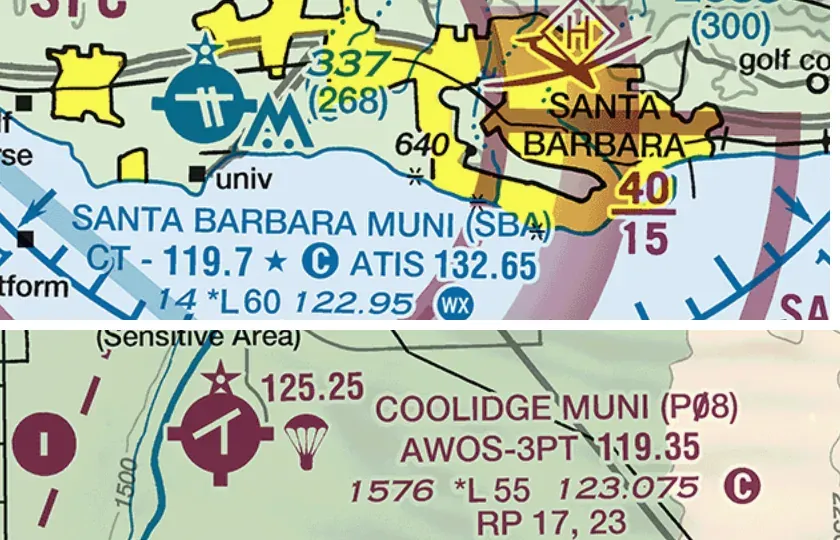 Towered vs non-towered in the wild: CT plus a frequency against CTAF, elevation and runway length in both.
Classic question shape: “The traffic pattern for runway 9 at this airport is normally flown left-hand unless the Chart Supplement indicates otherwise — which runway is right traffic?” Chart-side, you can’t always tell; the Chart Supplement holds pattern directions. Know which questions send you to which source: the chart for symbols, the Chart Supplement for procedures and hours, NOTAMs for what changed today.
Scenario 4: “Where’s the TFR?”
Setup: Everything on the chart looks clean — Class G, no obstacles, no special use airspace. Is the flight legal?
The chart can’t answer that question, and that’s the lesson. TFRs are NOTAMs, not chart symbols — a wildfire TFR, a VIP movement, or a stadium TFR can exist in full legal force over a chart that shows nothing but empty Class G. The charted cousins are the permanent ones: prohibited areas, the DC SFRA/FRZ boundary, NSAs.
Your preflight has three layers, in order:
- The sectional — class, floors, obstacles, special use airspace (static, 56-day cycle)
- The Chart Supplement — tower hours, pattern altitudes, procedures (static-ish, 56-day cycle)
- NOTAMs and TFRs — the overlay that changes daily (and sometimes hourly)
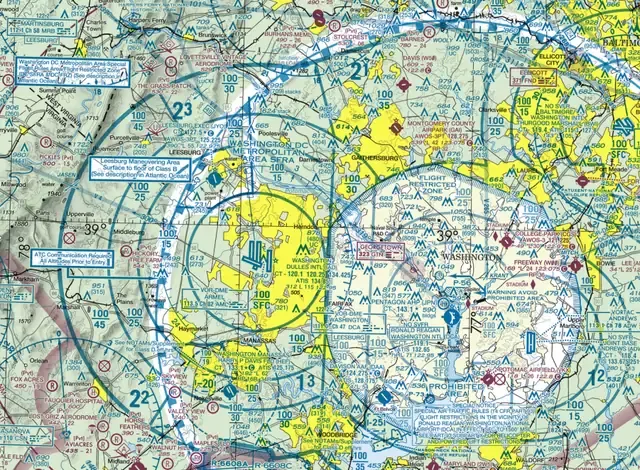 The charted face of ‘today’s rules’: the DC SFRA and FRZ are the permanent versions of restrictions that usually arrive as NOTAMs.
Checking the chart but not the NOTAMs is how drone pilots violate TFRs. The AIM’s UAS chapter warns of “substantial fines and penalties” — and the check itself takes two minutes at 1800wxbrief.com or in your planning app.
Scenario 5: “The Point Between Two Airspaces”
Setup: A point sits under a shelf where the marker reads 70/30, ground elevation 800 ft, and the question asks about a flight at 350 ft AGL.
- Shelf floor: 3,000 ft MSL
- Your flight: 800 + 350 = 1,150 ft MSL
- 1,150 is 1,850 ft below the floor → Class G, no authorization
Same structure every time: convert the flight to MSL, compare to the charted floor, answer.
Scenario 6: “The Combined Read”
Setup: A figure shows a point in soft magenta shading with a lighted obstacle nearby marked 2,103 (503 AGL). Ground elevation at the point reads 1,600 ft MSL. The mission: inspect the obstacle from the air.
- Airspace: soft magenta = Class E with a floor at 700 ft AGL. Below the floor is Class G. And here’s the rule most courses muddle: §107.41 requires authorization in Class B, C, D, and Class E surface areas — it says nothing about Class E that begins at 700 or 1,200 ft. Non-surface Class E is not an authorization airspace for Part 107.
- The structure rule: staying within 400 ft laterally, §107.51(b) permits up to 503 + 400 = 903 ft AGL over the structure.
- The combined answer: the inspection may legally run to 903 ft AGL. The 700-ft Class E floor above you doesn’t cap the mission, because that Class E is not a surface area and doesn’t trigger §107.41.
The exam version of this point: “authorization is required in which airspace?” — B, C, D, and E-to-the-surface. Never the vignette floors. (Practically, most low-altitude work stays near the structure anyway, and the structure rule only applies within 400 ft of it — step outside that radius above 400 ft AGL and you’re violating §107.51(b) regardless of airspace.)
Exam Day Tips for Chart Questions
- Use the Testing Supplement — every figure is in it, with a legend at the front
- Read the figure reference exactly — “Figure 21, Area 4” means that area, not the pretty airport nearby
- Put a finger on the point — spatial questions beat eye-memory
- Convert MSL/AGL before deciding — write the subtraction on the scratch material
- Chart questions take longer but are worth the same points — bank points on the fast ones, spend time here
Key Facts to Walk In With
ACS reference: II.A (applied), II.B.K2–K5
- Decision tree order: B → C → D → E-surface → E-700 → E-1200 → G
- E extensions along approach corridors = Class E to the surface
- Obstacle math: MSL top, AGL structure, ground = MSL − AGL
- 400-ft structure rule: +400 ft above the top, within 400 ft laterally
- Runway number = magnetic azimuth ÷ 10
- TFRs are NOTAMs, not chart symbols — three-layer preflight: chart, Chart Supplement, NOTAMs
Quick Check
Q: The FAA shows you a point inside a dashed blue circle. What airspace are you in? A: Class D. Authorization required.
Q: An obstacle shows 2349 (487 AGL) with a lightning bolt. How tall is the structure and is it lighted? A: 487 ft tall, lighted at night.
Q: True or false: You can fly in a MOA without authorization. A: True. MOAs are not restricted airspace, but exercise caution for military training.
Q: The chart shows nothing at your site. Is the flight automatically legal? A: No. The chart is one of three layers — NOTAMs and TFRs overlay it, and they change daily.
Q: Runway 27’s magnetic azimuth is approximately? A: 270°. The number is the azimuth ÷ 10, rounded to the whole number.
What’s Next?
Airspace and charts mastered! Next up: weather. Understanding the atmosphere, reading weather reports, and knowing when it’s safe to fly.
This free course covers the essential knowledge, but if you want video walkthroughs, practice exams, and instructor support, Pilot Institute’s Part 107 course is the most comprehensive option available.