Airports & Obstacles on Charts
Airport symbols on a sectional answer two questions instantly: does this field have a control tower, and is the runway paved? Obstacle symbols answer a third: what’s the tallest thing between you and where you’re going, in MSL and AGL, and is it lit? Together with the Maximum Elevation Figure printed in each grid quadrangle, they’re the chart’s collision-avoidance layer — and the source of some of the easiest points on the exam.
Airport Symbols — The Easiest Points on the Exam
The FAA tests two things about every airport symbol: tower or no tower, and runway surface type.
Towered vs Non-Towered
- Blue airport symbol = has an operating control tower. Likely controlled airspace — authorization probably required.
- Magenta airport symbol = non-towered airport. May or may not sit in controlled airspace — check the surrounding boundaries, not the symbol color.
Runway Type by Symbol Shape
- Solid/filled shape = hard-surface runway (paved)
- Open/unfilled shape = soft-surface (turf, gravel)
- Circle with an H = heliport; anchor symbol = seaplane base — same blue/magenta convention
Reading Airport Data Blocks
Next to each airport symbol sits a compact data block. Typical contents:
Towered Airport (Blue)
- Airport name and city
CT= control tower, followed by the tower frequency (e.g., CT 125.3)- Field elevation in feet MSL
- Longest runway length in hundreds of feet (“65” = 6,500 ft)
L= lighted;*means the lighting or service is part-time
Non-Towered Airport (Magenta)
- Airport name and city
CTAFfrequency — Common Traffic Advisory Frequency, where pilots self-announce- Field elevation in feet MSL
- Runway length
Worked Decode (composite example)
A magenta airport symbol with this block: Wildhorse Field, CTAF 122.9, elevation 4,555, runway 40 L. Read: non-towered (magenta + CTAF, no CT line); field elevation 4,555 ft MSL; longest runway about 4,000 ft (“40” is hundreds of feet); lighted (L). Now the cross-check: if a dashed blue circle sat around this field with a bracket reading [70], the Class D would run from the surface to 7,000 ft MSL — that’s 2,445 ft of Class D above a 4,555-ft field, right at the usual 2,500-ft pattern, and every foot of it requires authorization.
The FAA often asks about CTAF vs tower frequency. CTAF is for non-towered airports, where pilots coordinate with each other by self-announcing position and intentions. Tower frequency is for talking to ATC at towered airports. At some airports the same frequency serves both roles part-time — but the concept split is what the exam wants.
The Chart Supplement: When the Sectional Isn’t Enough
The sectional data block is the summary. The Chart Supplement (formerly the Airport/Facility Directory) is the detail sheet the FAA publishes for every airport, regionally bound, and the exam expects you to know what’s in it:
- Airport remarks — including the hours a part-time tower operates, and what the airspace becomes when it closes (Class D often reverts to Class E, or Class G — this is a classic exam scenario)
- Communications — tower, ground, approach, CTAF, UNICOM, and automated weather frequencies
- Runway data — surface, dimensions, lighting systems, and traffic pattern altitude and direction
- Services and fuel availability
- Weather sources — ASOS/AWOS locations and frequencies for the field
You won’t read a full Chart Supplement entry at the test center — but “where would you find the tower’s operating hours?” is a real question shape, and the Chart Supplement is the answer. Lesson 22 returns to it for airport operations.
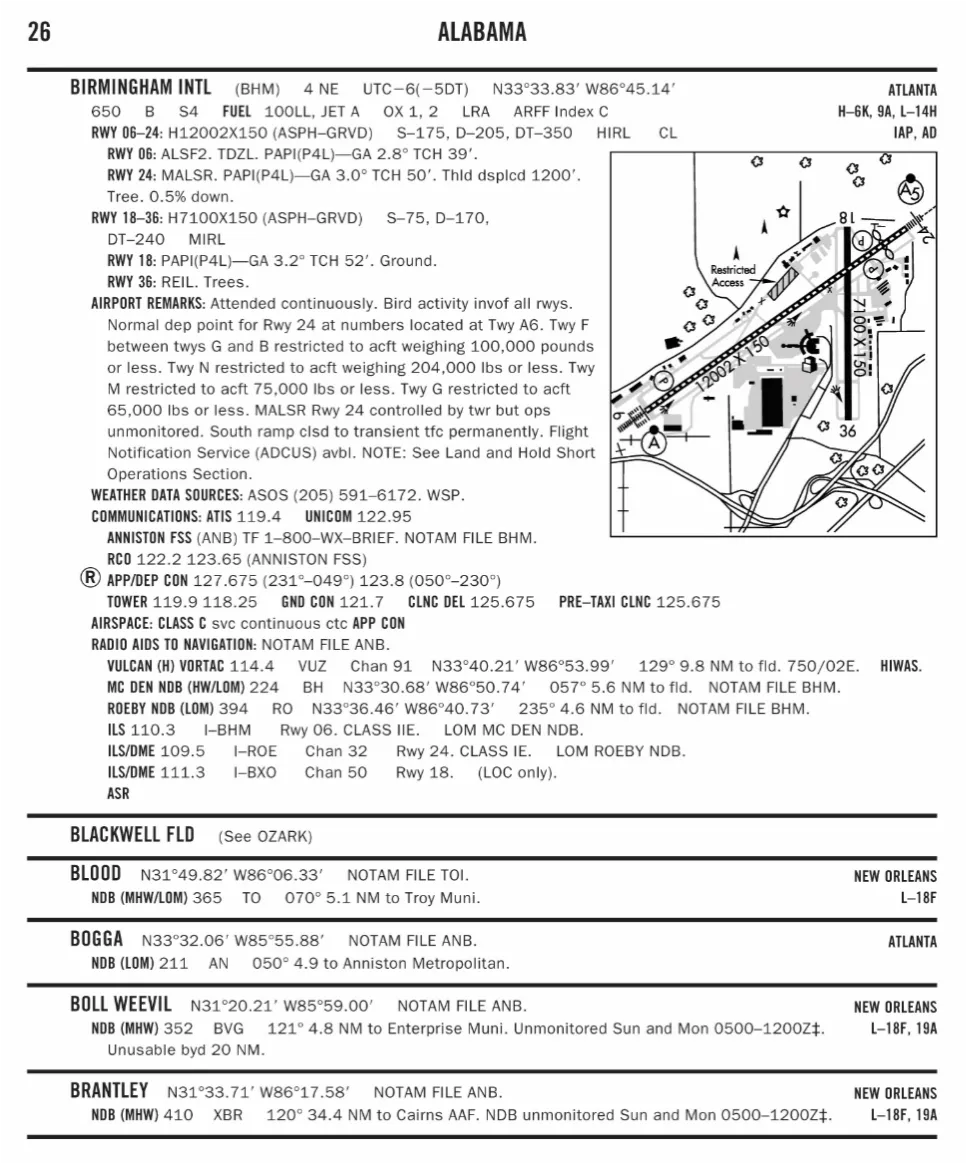
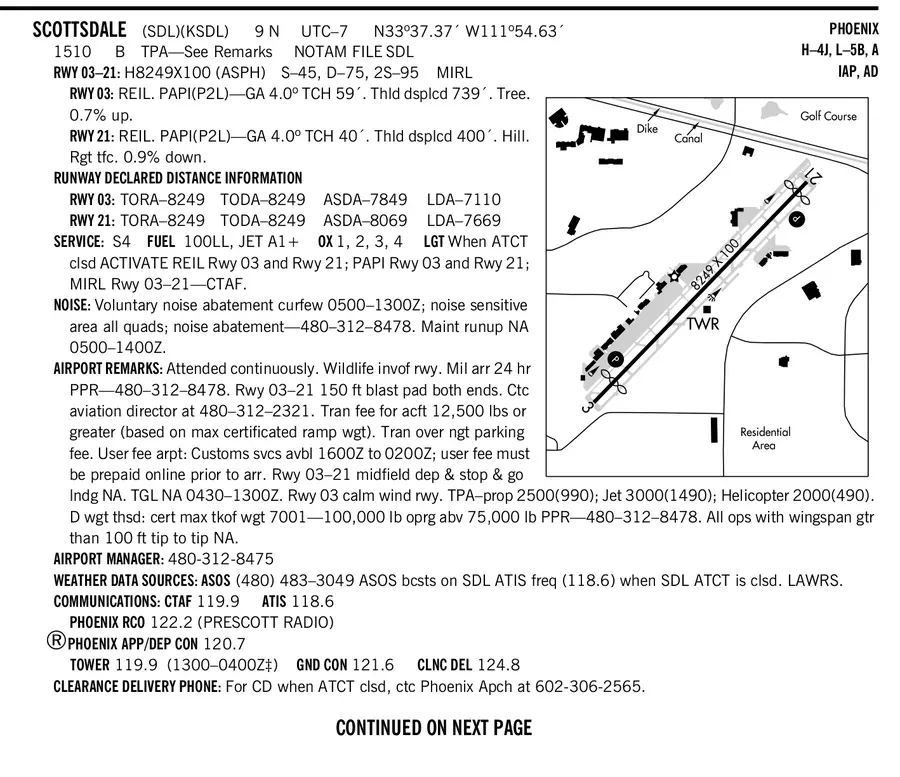 A real Chart Supplement entry: tower hours, pattern altitude, frequencies, and the remarks line that tells you what the Class D becomes when the tower closes.
Obstacle Symbols
Individual Obstacles (Towers, Buildings)
- Triangle with a dot at the top
- Two numbers beside it:
- Top number (bold) = height in feet MSL
- Bottom number (parentheses, AGL) = height above ground
- Lightning bolt next to the symbol = lighted at night
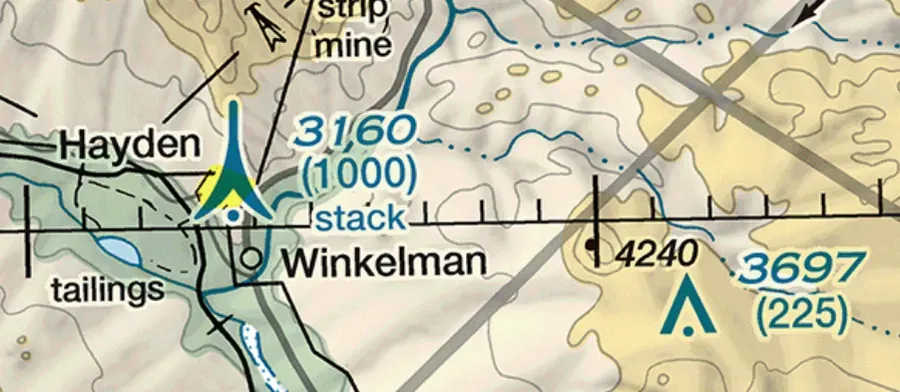 Two numbers and a bolt: 1,562 ft MSL on top, 311 ft AGL below, lighted at night. Ground elevation hides in the subtraction.
The FAA will show an obstacle that’s 1,200 ft MSL (400 ft AGL) and ask how high you can fly within 400 ft of it. Under 14 CFR §107.51(b), you may fly up to 400 ft above the structure’s uppermost limit when you stay within a 400-ft radius of it — so up to 800 ft AGL near that tower, in uncontrolled airspace, without touching the 400-ft-AGL rule.
How Obstacles Are Lighted (ACS II.B.K7)
Lighted obstacles carry the lightning bolt on the chart, and in the world they show several patterns:
- Steady or flashing red lights on towers and stacks
- High-intensity flashing white strobes that change intensity with the time of day
- Dual systems — red at night, white strobes by day
Near airports and along ridgelines, also expect marked catenary systems: power-line crossings strung with marker balls, especially over river valleys. The wires between towers are essentially invisible from the air — see the wire-environment discussion in the previous lesson.
Uncharted and Unlit Hazards (ACS II.B.K8)
The chart is not the ground truth of everything that can hit you. Obstacles generally must reach about 201 ft AGL to qualify for charting — which means every shorter tower, pole, mast, and wire in the country exists at full lethality with no symbol at all. Many charted obstacles are also unlit, and vegetation (trees) doesn’t carry lighting. The practical rule for low-level work: the chart tells you where the known tall things are; your eyes and a site walkthrough tell you about the rest.
Groups and Under Construction
- Clusters of triangles mark a group of obstacles; the elevation shown is the tallest of the group
- UC next to a symbol means under construction, with the height representing the planned final height — treat it as already that tall, because by the time you fly, it might be
Maximum Elevation Figure (MEF)
Look for large bold numbers within each latitude-longitude quadrangle on the chart. The official definition: the MEF “represents the highest elevation within a quadrant, including terrain and other vertical obstacles (towers, trees, etc.).”
The computation adds safety allowances on top of the highest known feature:
- Natural terrain: highest terrain elevation + a possible vertical error allowance + 200 ft for uncharted natural obstacles (trees, unsurveyed rises), then rounded up to the next 100 ft
- Man-made obstacles: the structure’s elevation + its vertical error allowance, again rounded up
For drone pilots the MEF’s real value is situational awareness at a glance: an MEF of 125 in your operating quadrangle means nothing in that square — known or unknown — reaches 12,500 ft MSL, so a 400-ft flight over any terrain in it is nowhere near the top of the clutter. The exam rarely asks you to compute an MEF from raw ingredients; it asks you to know what the number represents.
Aircraft Lighting You’ll See (and Need)
Two lighting codes round out this lesson, because the ACS pairs ground-structure lighting with aircraft lighting (II.B.K9–K10):
- Manned aircraft at night show navigation lights — red (left wingtip), green (right wingtip), white (tail) — plus a flashing beacon or strobes. A single flashing light crossing the sky at night is almost always an aircraft; treat it as one.
- Your drone at night must display anti-collision lighting visible for 3 statute miles under the post-April-2021 night rule (14 CFR §107.29), unless you’ve waived it. Night operations get their full treatment in the regulations lessons — this is the chart-side pointer.
Key Facts to Walk In With
ACS references: II.B.K7–K10, V.B.K1, V.B.K6a, V.B.K8
- Blue airport = towered; magenta = non-towered; solid shape = paved runway
- Data block: CT/CTAF frequency, elevation MSL, runway length in hundreds,
L= lighted - Chart Supplement: tower hours, pattern altitudes, frequencies, fuel, remarks
- Obstacle: top number MSL, bottom (AGL); bolt = lighted; UC = final planned height
- 400-ft structure rule: within 400 ft laterally, up to 400 ft above the structure’s top
- MEF = highest thing in the quadrangle + allowances, rounded up to the next 100 ft
- Night: 3-SM-visible anti-collision light on your drone (§107.29)
Quick Check
Q: A blue airport symbol indicates what? A: A towered airport with an operating control tower.
Q: An obstacle shows 1200 (400 AGL) with a lightning bolt. What does the lightning bolt mean? A: The obstacle is lighted at night.
Q: Where do you find a part-time tower’s operating hours? A: The Chart Supplement entry for the airport — which also tells you what the Class D becomes when the tower closes.
Q: What is MEF? A: Maximum Elevation Figure — the highest elevation in the quadrangle including terrain and obstacles, plus safety allowances, rounded up to the next 100 ft.
Q: An obstacle marked 1,530 (530 AGL). You’re inspecting it and staying within 400 ft of the structure. How high can you go? A: Up to 930 ft AGL — 400 ft above the structure’s uppermost limit under §107.51(b).
What’s Next?
Now let’s learn to read coordinates and terrain features: the remaining chart-reading skills you need for the exam.
This free course covers the essential knowledge, but if you want video walkthroughs, practice exams, and instructor support, Pilot Institute’s Part 107 course is the most comprehensive option available.