DaVinci Resolve for Drone Pilots: Complete Beginner Guide
The industry-standard color grading software is completely free. Here is how drone pilots can get started with DaVinci Resolve.
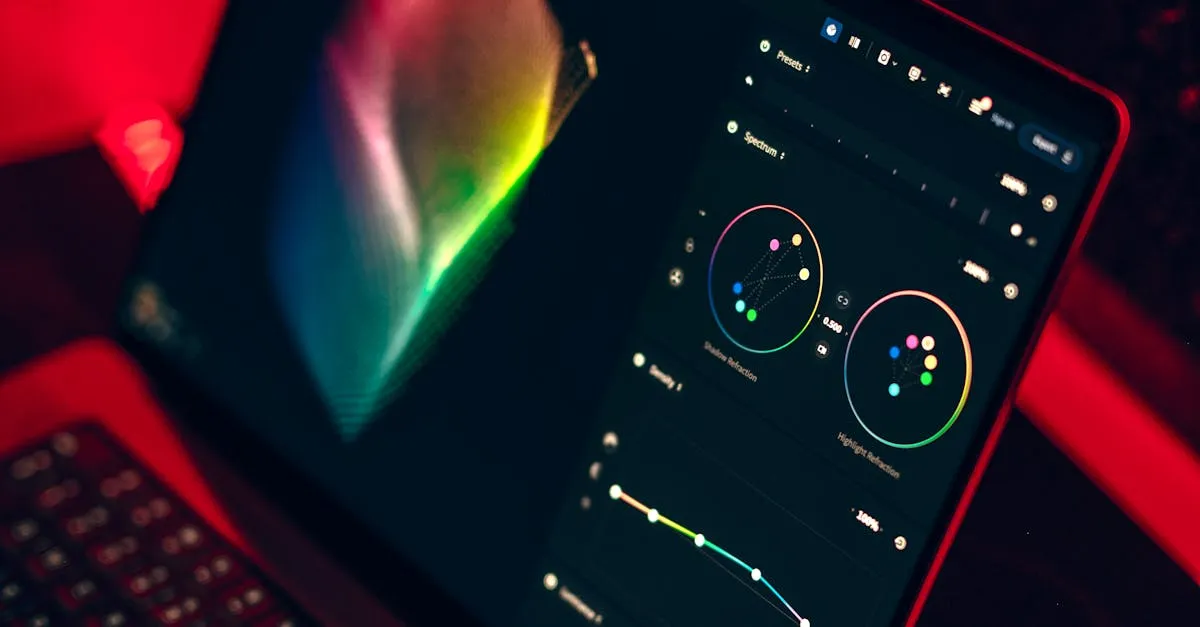
DaVinci Resolve offers Hollywood-grade color grading tools completely free, ideal for drone pilots. The Color page provides primary wheels, curves, qualifiers, power windows, and scopes. For D-Log footage, use Color Space Transform on your first node to convert to Rec.709 before creative grading.
DaVinci Resolve is the color grading software used on Hollywood feature films, and the standard version is completely free. No subscription. No trial period. No watermarks. For drone pilots who want professional-grade color tools, there is no better option at any price.
Why Resolve Over Premiere or FCPX
Three reasons drone pilots should choose Resolve:
Superior color tools. The dedicated Color page with primary wheels, log wheels, curves, qualifiers, power windows, and scopes is unmatched. Premiere’s Lumetri panel feels like a toy in comparison.
No subscription. Premiere costs $275.88 per year, forever. Resolve Standard is free. Resolve Studio (the paid version) is $295 one-time. Both are cheaper than a single year of Adobe. (Pricing as of late 2026 — check current prices before buying.)
All-in-one. Resolve includes editing (Edit page), color grading (Color page), audio mixing (Fairlight page), visual effects (Fusion page), and delivery (Deliver page). Five professional tools in one application.
The Interface: Seven Pages Explained
Resolve organizes your workflow across seven pages:
Media: Import footage, organize bins, manage metadata.
Cut: Fast assembly editing for rough cuts.
Edit: Full editing timeline with transitions, titles, and effects.
Fusion: Compositing and motion graphics (node-based, like After Effects).
Color: The star of the show. Primary wheels, curves, qualifiers, power windows, scopes, and LUT management.
Fairlight: Professional audio mixing with EQ, compression, and noise reduction.
Deliver: Export settings for every platform.
The Color Page: Where the Magic Happens
For drone pilots, the Color page is where you spend most of your time. Here is a quick tour:
Primary wheels (Lift, Gamma, Gain, Offset) adjust shadows, midtones, highlights, and overall color. Use these for corrections.
Log wheels give you finer control over specific tonal ranges within the log curve.
Curves (Custom and HDR) let you target specific brightness values for precise adjustments.
Qualifiers isolate specific colors so you can adjust just the sky, just the grass, or just the skin tones.
Power Windows draw shapes to isolate regions. Darken just the sky without affecting the foreground.
Scopes (Waveform, RGB Parade, Vectorscope, Histogram) show objective data about your footage. Trust these over your eyes.
Nodes are the building blocks of your grade. Each node is a separate correction or creative adjustment. Stack them in a chain for complex grades.
Getting Your Drone Footage In
Import your clips in the Media page. Resolve handles H.264, H.265, and D-Log footage natively. Drop clips on the timeline in the Edit page, then switch to the Color page for grading.
For D-Log footage, set up Color Space Transform (CST) on your first node to convert from DJI D-Gamut/D-Log to Rec.709. This gives you a neutral starting point for grading.
Learning Resources
Blackmagic Design offers free training videos on their website. The “Beginner’s Guide to DaVinci Resolve” covers everything from import to export in a few hours.
Frequently Asked Questions
Why choose DaVinci Resolve over Premiere Pro? Superior color tools with a dedicated Color page, no subscription since the standard version is free, and it is an all-in-one solution with editing, color, audio, effects, and delivery.
What are the seven pages in DaVinci Resolve? Media for importing, Cut for fast assembly, Edit for full timeline, Fusion for compositing, Color for grading, Fairlight for audio mixing, and Deliver for export.
How do I set up D-Log footage correctly? Import in Media page, drop on timeline in Edit page, switch to Color page. Set up Color Space Transform on your first node to convert from DJI D-Gamut/D-Log to Rec.709.
What Color page tools are most useful? Primary wheels for shadow/midtone/highlight corrections, Qualifiers to isolate colors like sky, Power Windows to darken regions, and Scopes (Waveform, RGB Parade) for objective data.
How do nodes work? Each node represents a separate correction or adjustment. Stack them in a chain: Node 1 for CST, Node 2 for primary corrections, Node 3 for creative looks. Every adjustment stays isolated.
Is DaVinci Resolve really free? The standard version is completely free with no subscription, trial period, or watermarks. Resolve Studio costs $295 one-time (as of late 2026) for advanced features like noise reduction and HDR tools.
Our free Drone Color Grading and Editing Masterclass is specifically designed for drone pilots using Resolve. It covers the exact workflow for converting flat drone footage into professional, cinematic video.